Showing posts with label Product review. Show all posts

Sunday, October 16, 2011

Siri is a Great One Liner

When it comes to 2-way communication, Siri is quite limited. Before I go further on this allegation, let me make myself clear that I think Siri's natural language parsing is by no means a small achievement.

Seeing it in action

I spent a little time with Siri today and made this video to share:

Overall, Siri is very good at understanding natural English, to the point that you have nearly no need to learn any syntax to operate it. However, there are still some rules you need to be aware of. By and large, your day-to-day plain English, like "what are the Indian restaurants around here", or "find me an Indian restaurant", or any other ways of expressing this idea, can be handled quite comfortably by Siri, most of the time. Sometimes, you need to repeat yourself. Not a big problem.

But when it comes to a series of back-and-forth between you and the device, Siri can get a little stubborn. As you can see in the video, I asked "When is Christmas" and Siri answered perfectly. Impressive. But when I followed up with the request to "set an appointment on that day", Siri failed to associate Christmas with "that day" as a human being would.

In my test, had I say "set up an appointment on Christmas day" instead of "that day", Siri would have understood me perfectly. We human beings work mostly with implicit meanings in conversations; otherwise we would be a verbose bunch. With Siri, that assumption falls apart. To avoid yelling at Siri for being stupid, you need to start practicing forming complete, self-containing sentences today. Yikes! To some, that's more daunting that typing in an appointment.

Fair assessment

Having tried Siri, I must say, as long as you make your statement clear, you can say it however you want and Siri can understand you perfectly. Using Nuance technology, the voice to text conversion is mostly flawless too.

Where Scott Forstall tried to sell the idea of Siri "following along the conversation just like a human being does", I think it is mostly not true. To be fair, that type of conversation is NOT the intended use of Siri anyway, as that capability represents true AI that we human has yet to grasp. Looking at Siri's behavior now, it is safe to say that we have a long way to go before Siri can talk to us like Jarvis to Tony Stark.

Wednesday, April 30, 2008

Microsoft Messenger for Mac 7.0 Now Available

Microsoft's little chat program for Mac is not dead. In fact, it is very much alive, so much alive that it is now part of Windows Live.

The new version supports bonjour networking within your LAN. There is also a new search function inside the contact list that mimics Spotlight search. That's about all for the consumer side of it. The corporate features are a little bit more exciting, but I find them largely irrelevant to most Mac users.

So here's the thing: for all you iChat and Adium users out there, do you really care? As for me, I will stick with Adium, thank you very much!

But I would really like to know what you think, so I am running a little poll to find out what IM clients most people use on their Macs. Look for the poll at the sidebar to throw your lot in, if you are interested in adding your numbers to it. The poll will be held till May 16, 2008.

If you are so inclined in trying out Windows Messenger for Mac 7.0, by all means do so. You can download the program at Mac BU official website.

Yet another Mac tip is on the web!

Friday, October 28, 2005

Field Trip @ Apple Store: iPod's Video Function Tested

iPod's video function tested!

Since the launch of the new iPod about two weeks ago, I have wondered whether videos would look good on the tiny screen. Last Sunday I finally got a chance to play with it at the Apple store.

Size matters

Your digital cameras might be one of the latest modals that come with 2.5" LCD screens, so you may very well know how it is like when running videos on the iPod. In fact, 2.5" is quite big for a portable device that fits into your pocket. The size of the screen is great for casual moments like sharing kid's birthday videos or the latest greatest music videos with friends, but still a far cry from serious movie treats with home-popped popcorns.

iPod + TV

What if you can hook it up to a TV set and play Finding Nemo to everyone in the living room? If so we may just forgive the size limitation with the iPod screen. And according to the Apple store guy, "that's the whole idea of it". Sounds great, doesn't it? Wait till you hear the full story.
I asked the same Apple guy whether the iPod could handle videos in various sizes and adjust them dynamically to fit the 2.5" screen, and the answer was No. It turns out that iPod can only handle videos up to 320 x 240 pixels, which is the native resolution of the screen itself (that's half the TV's resolution, but TV does interlaced frames, so I think it doesn't matter). That isn't very impressive in the age of high-resolution content. However it is still okay to play video on TV with the iPod as long as you are not looking for a cinematic experience. Steve Jobs, Apple's CEO, demonstrated that at the product launch using a footage from U2's live concert and it worked reasonably well.

The bottom line is, there is no HD support yet with this release. Perhaps when Apple finally rolls out the true iPod Video, there will be. Let's keep hoping.

Do we like it?

Still, there are things to like about the iPod's video function. Videos run smooth on it, and the LCD delivers sharp images and dynamic colors. Although it may take a few seconds to load the video (buffering, as they call it), once the video starts rolling it will play without skips and delays (unless you have a corrupted file).

And let's not forget that with the new iPod you can now put tons of video content in your pocket and play it on the device itself as well as standard TV sets and projectors. I am sure all of us can think of ways to capitalize on this new freedom. For example, some people are already using the iPod Photo to do slides presentation, now with the new iPod they get to do video presentation as well.

Should you buy it?

If you have craved for the big iPod all these while, by all means get one of these new iPod! With or without video it doesn't make the iPod a less exciting portable music player than it already is. Plus video? Why not!? All in all, the new iPod makes a very good video device on the road. I'd want to use this gadget to watch video podcasts and comedies, but definitely not Star Wars.

Monday, September 12, 2005

iPod Nano Tested, Hands-on!

iPod Nano
Macnify has had a hands-on review on iPod Nano! Yes, nothing is more exiting and appropriate than discussing the new Nano in this debut topic on Macnify.

What is Nano? In short, it is a replacement of the blockbuster iPod Mini digital music player. The differences? A quick list of items would be 1) the physical dimension of Nano shrinks by a few orders, 2) the display is upgraded to a color screen, and 3 ) flash memory in the sizes of 2GB/4GB is used in place of the hard drive. What remain unchanged are all-things-iPod including the familiar layout of click-wheel user interface, and the price tag. Among all the changes, the two most obvious ones have got to be the nano-scale body and, well, the nano-scale color screen.

Nano-scale body with color screen


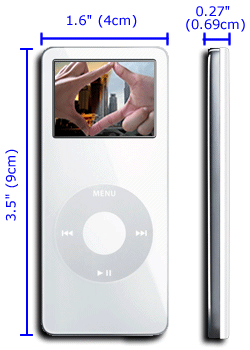
The power of the full-featured iPod is packed in a card-size body of 3.5" x 1.6" x 0.27". That's about four to five credit cards' thickness, and about two-third of a credit card's surface area. Its weight at 1.5 ounces is twice that of a Shuffle, therefore it does not go as unnoticeable as the later when tugged into your jeans. Still, the feeling I get while holding it in my hand tells me that this is a true light-weight gadget.

The 1.5", or 172pixel x 132pixel color LCD works fine for normal iPod operations, but is a little demanding for viewing photos. However, the colors are dynamic, and I find it much better than most of the mobile phones out there in terms of sharpness. Although it is not much fun seeing pictures on a screen that small, the speed of decoding images is awesome (read: instantaneous). That makes scrolling through images painless.

It is to be noted that, years ago Apple ditched the physically rotating click-wheel in favor of the touch-sensitive one. This brought at least two advantages: 1) elimination of physically damages by doing away with moving parts and 2) reduction size. In this episode with hard drive being replaced by flash memory, Apple has again achieved the similar results. In fact, the moving arm found in the hard drive is about the last moving object in an iPod, and by removing it Apple has eliminated all possibilities of product failures due to broken joins of moving parts.

For the complete specifications, see the official Nano site.

Sound matters


Since it wasn't possible for me to test the audio quality (I tried out the Nano at a noisy local Apple store where the staffs were blasting music off the demo set through powerful suonddock), I could not comment on it. A quick look up on other iPod-centric websites tells that it is apparently too early for anyone to have a serious test run on the audio issue. I would recommend you to keep a look out on playlistmag.com for any future review on Nano's sound performance.

My guess is that, it would be on par with, if not better than, the Shuffle and the latest iPod Photo. Apple has always been critizied for iPod's rather flat sound quality until they finally pulled it off with these two products. It figures that Apple will put the lessons learnt into Nano. Still, I am only guessing.

Sticking to the iPod Legacy


With Nano, Apple has made its statement of its ability to migrate the guts found in big-brother iPod Photo while pushing the limits in miniature design. You will find the same software user interface, the same click-wheel configuration, and the same dock connector, all nicely placed in the familiar layout. Until Apple finds ways to improve any of these features across the board, Nano's consistency with the standard iPod platform can only be a good thing. It means that with Nano you have virtually no learning curves to overcome, you can continue to boom music through your expensive Bose Sound-dock (or other similar products, for that matter), plus you can take it out on a jog and expect it to endure the vigor just like the Shuffle without fearing that the hard drive may fail.

Wrapping up


After checking out what are in the package, it is clear that calling Nano a the replacement of Mini is a misnomer. Some say it is a bigger-size Shuffle with a screen, but I disagree. It is in the very essence a scaled-down flash-based iPod Photo. It works (almost) like the granddaddy iPod Photo, and it is incredibly small in size. In other words, it's got the mojo! If iPod is already good for you, the only remaining question about Nano would be: is it better than ever?

Yet another Mac tip is on the web!